Handling parallel async operations in Node.js (JS)
Node.js is, at its core, a single-threaded environment for running JavaScript on the server. The JavaScript you run on Node.js executes on a single thread. So how does Node.js handle things in parallel?
Node.js is, at its core, a single-threaded environment for running JavaScript on the server side. The JavaScript you run on Node.js executes on a single thread. So how does Node.js handle a ton of connections at once? 😀 The answer is non-blocking asynchronous I/O. Honestly, it’s not quite that simple. There’s a thread pool in libuv (a C library used at the core of Node.js) that makes blocking things behave like non-blocking ones. One way or another, in Node.js we handle everything asynchronously, which lets thousands of clients get served right away. Plenty of articles out there explain this in detail, so I won’t rewrite them here, just ask Google 😌.
At the end of the day, a Promise is what represents an asynchronous action. Since callbacks can easily be rewritten as a Promise, I won’t go into which one you should use in this post. Here I’ll focus on something more specific: “running asynchronous operations in parallel in Node.js, efficiently and correctly”.
Since Node.js 4 (with the --harmony flag), we’ve been able to use the native Promise. MDN describes Promise like this:
The Promise object represents the eventual completion (or failure) of an asynchronous operation, and its resulting value.
One thing to remember here: once a Promise is created, it has actually started running, whether or not you call .then. As soon as you call fetch("https://example.com/"), a request is made; .then or .catch is only needed when you want to handle the response 😐. This way, if several Promises are created (say we call fetch multiple times, one under the other), the requests run in parallel.
Let’s start with a small example, assuming the parameters and functions mean the following:
numberOfOperations: the number of async operations to runlistOfArgument: holds the arguments passed toasyncOperationon each call.asyncOperation: a function that fakes an async operation: it returns a Promise that resolves within 1 to 10 seconds.listOfDelays: an array holding the number of seconds eachasyncOperationtakes to resolve.watchCounter: a function that tracks how many Promises are running at the same moment, printing to the console every second.
// This variable tracks how many Promises are running at a time
let counter = 0;
let interval;
// Total number of operations
const numberOfOperations = 25;
// Arguments for each operation
const listOfArguments = [];
// Delays for each operation to fake async
const listOfDelays = [];

// Fill the argument and delay arrays for the operations
// Each delay is random, between 1000 and 10000 milliseconds
for (let i = 0; i < numberOfOperations; i++) {
  listOfArguments.push(i);
  listOfDelays.push(Math.ceil(Math.random() * 9) * 1000);
}

// Fake async: resolve a value after an arbitrary delay
// Increment counter to track how many promises run each second
const asyncOperation = index => {
  counter++;
  return new Promise(resolve =>
    setTimeout(() => {
      console.log('Operation performed:', index);
      counter--;
      resolve(index);
    }, listOfDelays[index]))
};

// Print how many Promises are running each second (for monitoring)
const watchCounter = () => {
  console.log('Promises running in the beginning:', counter);

  if (interval) {
    clearInterval(interval);
  }

  interval = setInterval(() => console.log('Promises running:', counter), 1000);
};
Running in parallel - Take 0 (attempt 0)
Look at the code below. We run asyncOperation and return the list of results.
async function take0() {
  // Let's go
  const results = [];
  for (const argument of listOfArguments) {
    const index = await asyncOperation(argument);
    results.push(index);
  }
  return results;
}
To be honest, this doesn’t run in parallel at all. We wait for each asyncOperation to finish one after another, which is why the results come back in exact order. We create a Promise on each iteration and wait for it to finish. At any moment only one Promise is running.
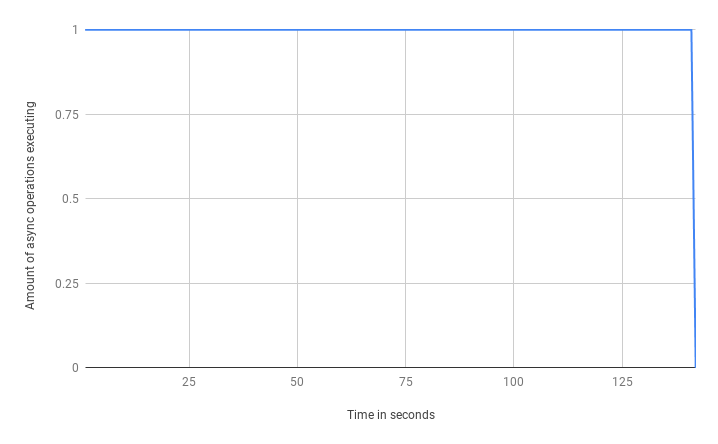
This takes 142 seconds to finish. The total time is the sum of the run times of every Promise created. Doesn’t look like a good solution (takes forever 😞).
Running in parallel - Take 1
I swear it will run in parallel this time. Let’s tweak the code above a bit. Instead of calling and awaiting asyncOperation on each iteration, call them all upfront with map. It returns a list of Promises ready to be awaited:
async function take1() {
  // Running Promises in parallel
  const listOfPromises = listOfArguments.map(asyncOperation);
  // Harvesting
  const results = [];
  for (const promise of listOfPromises) {
    const index = await promise;
    results.push(index);
  }
  return results;
}
Now every operation runs in parallel, and the results come back by awaiting each Promise.
The number of Promises running at a time decreases over time:
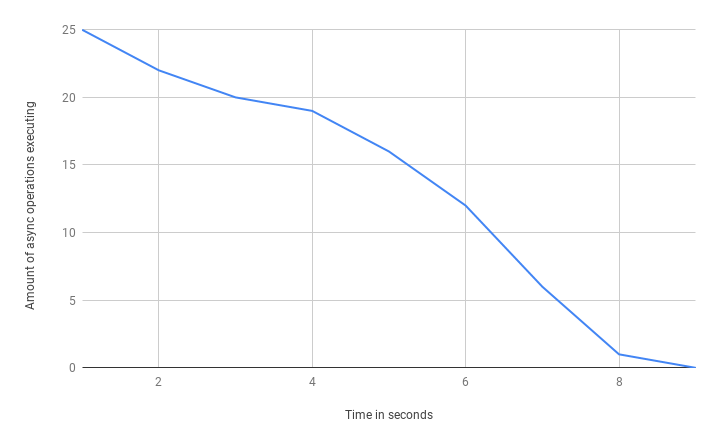
This takes only 9 seconds, much better. The total run time now equals the run time of the slowest Promise.
Running in parallel - Take 2
We can shorten the code in take 1 by using Promise.all. It takes an array of Promises and resolves as soon as all of them are resolved, or rejects if any one of them rejects.
async function take2() {
  // Run promises in parallel
  const listOfPromises = listOfArguments.map(asyncOperation);
  // Get the results
  return await Promise.all(listOfPromises);
}
The result is the same as take 2’s run, so everything seems fine. But there’s a threat we need to keep in mind 😕.
Running in parallel - Take 3
In the previous takes we got what we wanted: running Promises in parallel. But it runs all the Promises you give it in parallel at the same time, which can cause some problems.
What happens if asyncOperation calls a third-party API that has rate limiting? (Rate limit: a cap on the number of connections at a time from the server’s side.) It probably depends on how many Promises you want to run.
The key point: running operations in parallel is faster, but you should think carefully about how many parallel connections can actually run, and about the side effects (connection limits, resource limits) of running many tasks in parallel. It’s best to add logic to control how many tasks run at the same time.
Subtake - 0
The simplest thing we can do is split the tasks up front. Let’s set a threshold of at most 5 Promises running at a time. Here we work like pagination, splitting into batches. batchesCount is the number of rounds, rounded up: for example 32 promises means 32/5 ~ 7 rounds, with the last round running 2 promises in parallel.
async function take3subtake0() {
  const concurrencyLimit = 5;
  let results = [];
  const batchesCount = Math.ceil(numberOfOperations / concurrencyLimit);

  // Run Promises in parallel within each batch iteration
  for (let i = 0; i < batchesCount; i++) {
    const batchStart = i * concurrencyLimit;
    const batchArguments = listOfArguments.slice(batchStart, batchStart + concurrencyLimit);
    const batchPromises = batchArguments.map(asyncOperation);
    // Harvesting
    const batchResults = await Promise.all(batchPromises);
    results = results.concat(batchResults);
  }
  return results;
}
The result is as expected: 5 batches in total, no more than 5 Promises running in parallel at any moment, and the whole run takes 40 seconds. That’s more than 9 seconds (running everything at once) but still far better than 142 seconds 😌.
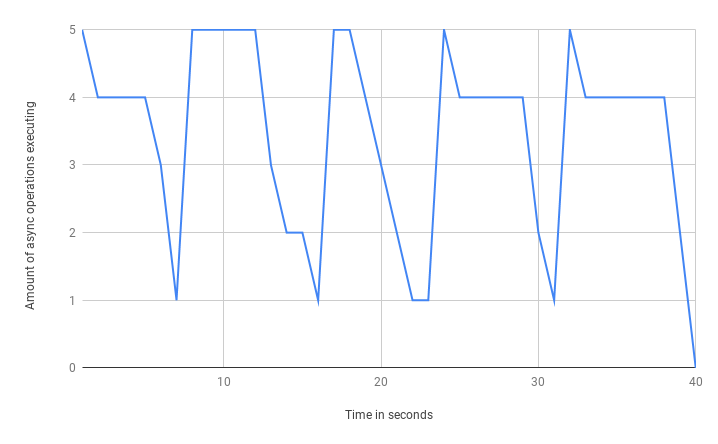
Looking at the chart you can see quite a few “peaks” of Promises. That means the load across Batches isn’t evenly distributed, and at some moments resources sit idle 😐, so it’s not very optimized. The problem is that a batch takes as long as the slowest promise in that batch. To make it clearer, a batch can have 5 promises, 4 of which take 1 second and 1 takes 10 seconds -> this batch takes 10 seconds to resolve, because we’re using Promise.all and it only resolves when everything has resolved.
Subtake - 1
To fix this, we need a different approach. Instead of splitting the Promise array into batches, let’s process things Promise-by-Promise. In the previous subtake, the logic was:
- Divide the number of Promises by the threshold to get the total number of
batches - Loop over the
batchesand run promises in parallel batch by batch - Put an
awaitin each iteration to run thebatchessequentially
Now let’s change the logic a bit:
- Take the next promise from the list (up to the threshold count)
- Call
asyncOperation - Chain the same steps to return a Promise (if there are promises left to run)
In short, whenever the number of running Promises is below the threshold, we push another one in. As soon as one finishes, the next one starts, and the maximum at any moment is exactly the threshold. In code:
async function take3subtake1part0() {
  const concurrencyLimit = 5;
  const argsCopy = listOfArguments.slice();
  const promises = new Array(concurrencyLimit).fill(Promise.resolve());
  // Push consecutive promises into the execution chain
  function chainNext(p) {
    if (argsCopy.length) {
      const arg = argsCopy.shift();
      return p.then(() => {
        const operationPromise = asyncOperation(arg);
        return chainNext(operationPromise);
      })
    }
    return p;
  }

  await Promise.all(promises.map(chainNext));
}
Done. This way we optimize the run time, there are no more Promise peaks, and the load is better.
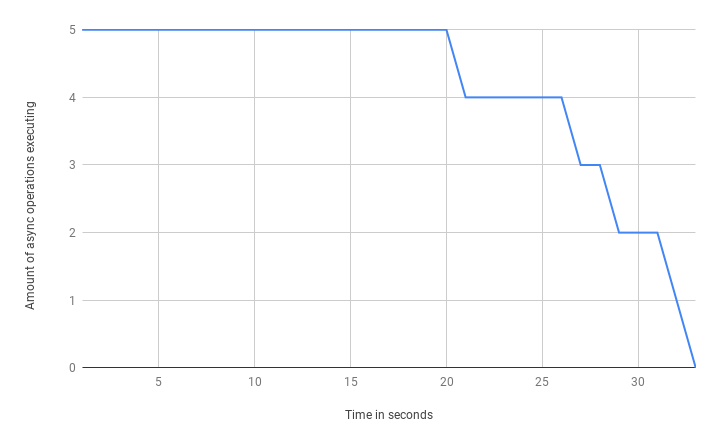
The whole run takes 33 seconds, 7 seconds less than before -> faster, nice 😎.
Looking good, but wait… I think I forgot something 😂. There’s nothing holding the array of results yet 😃. There are many ways to handle this. In fact we already know how many elements the result array will have, so let’s create an empty array upfront and fill it in whenever a promise resolves. Simple as this:
async function take3subtake1part1() {
  const concurrencyLimit = 5;
  // Create an index for the array
  const argsCopy = [].concat(listOfArguments.map((val, ind) => ({ val, ind })));
  const result = new Array(listOfArguments.length);
  const promises = new Array(concurrencyLimit).fill(Promise.resolve());
  // Push consecutive promises into the execution chain
  function chainNext(p) {
    if (argsCopy.length) {
      const arg = argsCopy.shift();
      return p.then(() => {
        // Store the result in the array when the Promise finishes
        const operationPromise = asyncOperation(arg.val).then(r => { result[arg.ind] = r; });
        return chainNext(operationPromise);
      });
    }
    return p;
  }

  await Promise.all(promises.map(chainNext));
  return result;
}
Finally done. We’ve accomplished what we set out to do: run async requests in parallel and keep them under control 😄.
Reference from @denis.fatkhudinov