Protocol Buffer 101
This post helps readers understand the benefits and use cases of protobuf.
Problem
In a distributed system, services need to talk to each other over the network, so we need a common data format to standardize that communication. We’re pretty familiar with popular data formats like JSON, XML, … when we want to talk to another system using human-readable text.
Because they are human-readable text formats, encoding JSON and XML costs quite a lot of bandwidth. For a small application with a small amount of data, it doesn’t matter much, but once you reach terabytes, optimizing the encoding saves a lot of resources.
That’s why Protocol Buffer was born. Protobuf provides an interface description language (IDL) so we can define the structure of the data we want to transmit.
// point.proto
message Point {
  required int32 x = 1;
  required int32 y = 2;
  optional string label = 3;
}
Above is the structure of a Point with coordinates x, y and a label. Each attribute of Point is defined with a validator (required, optional), a data type (int32, string), a name (x, y, label) and a field tag (1, 2, 3).
After defining it with the IDL above, there are libraries that generate functions for each language, which are then called like an RPC.
Now that we know how protobuf defines a data structure for communication, how does protobuf optimize the encoding?
Encoding
Let’s compare how JSON and protobuf encode data to see how protobuf optimizes the encoding.
Many people have worked on optimizing JSON and finding ways to encode it into binary. Here is how JSON gets encoded into a binary format by a library called Message Pack:
{
    "userName": "Martin",
    "favoriteNumber": 1337,
    "interests": ["daydreaming", "hacking"]
}
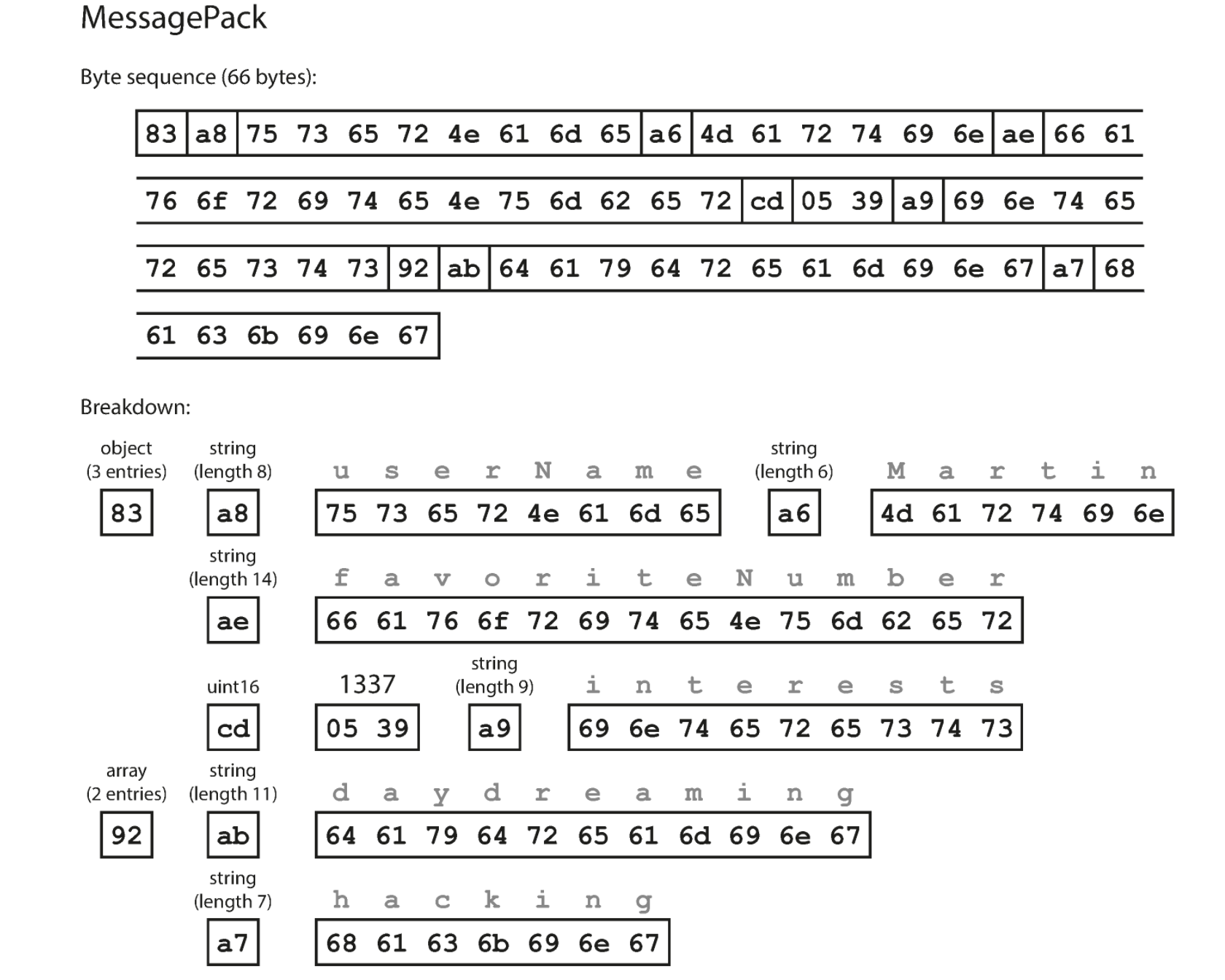
We can see that an encoded attribute includes its length, its data type, and the attribute names encoded as ASCII. The result after encoding is 66 bytes of data.
With protobuf, we are required to define a proto file describing the data structure we want to transmit, while JSON encoding doesn’t force us to do that. That definition is exactly what lets protobuf optimize the encoding. Let’s see how protobuf encodes the data structure.
// person.proto
message Person {
    required string user_name       = 1;
    optional int64  favorite_number = 2;
    repeated string interests       = 3;
}
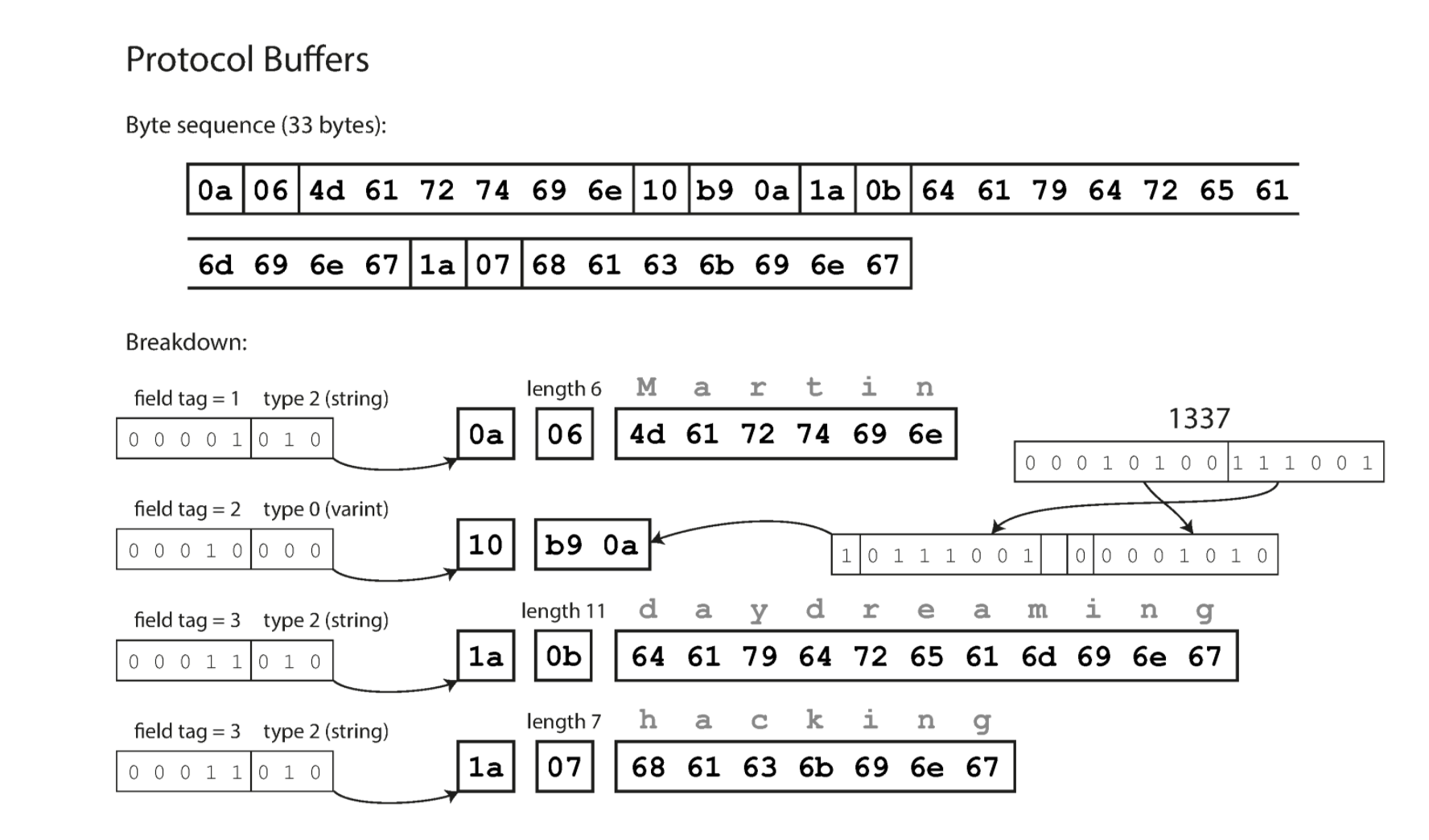
By using field tags, we replace encoding the attribute name directly. Since the field tag is independent of the attribute name, the cost of carrying attribute names is gone. The result shows the encoded data dropping from 66 bytes to 33 bytes.
Backward & forward compatibility
There is a concept called schema evolution, meaning the schema changes frequently during software development. In a distributed system, it’s a fact of life that old and new code exist in the system at the same time. So when using protobuf, how do we make sure new code can read data encoded by old code (backward compatibility) and old code can read data encoded by new code (forward compatibility)?
- When we change an attribute name, it doesn’t affect the encoding, because we only use the field tag to encode, so both backward and forward compatibility are preserved. But for the same reason, changing a field tag should be avoided, since old code would no longer be able to read data encoded by new code.
- When we add a new field with a new field tag, old code that hits that field tag will skip the attribute, because it doesn’t exist in its schema, using the attribute length described in the data. This gives us forward compatibility. When new code reads data from old code, it also skips the field if the field tag doesn’t exist, so backward compatibility is preserved. One caveat: don’t use required validation on the new field, because old data doesn’t have it and validation will fail.
- Removing a field works similarly, but make sure not to remove a required field, since that would also fail validation in old code.
- When changing a data type, old and new code reading each other’s data will run into many problems: they may not understand each other, or the encoding may even come out wrong. We should be careful here, and can create a new field with the new data type instead.
Usecase
Protobuf is usually used for internal communication (internal microservices), while communication with external systems usually uses JSON, XML or similar data formats, since they are human-readable and quite popular.
References
- Wikipedia: https://en.wikipedia.org/wiki/Protocol_Buffers
- Designing Data-Intensive Applications: The Big Ideas Behind Reliable, Scalable, and Maintainable Systems - Chapter 4. Encoding