Micro Frontends - microservices for the front-end
The idea behind Micro Frontends is to split a web app into distinct groups of features, developed by independent teams, each with a different mission.
Web front-end development in some large systems has long been done in a monolithic way (even if the backend has been turned into microservices), and everyone knows this is bad practice. Even when you start splitting code into components, using require or import to reuse them (splitting into UI component libs or your own javascript framework), you still end up with one “monolith” web app (a single block). It’s time to change that 😄.
Why front-end code is a “monolith”
Basically all web apps are “monoliths” by default unless you change how you develop toward micro frontends. Why move to micro frontends? For example, 2 front-end dev teams work on the same React code base, one on the admin part, one on the user board, say. These 2 teams have to sync with each other during deployment, and merge conflicts easily happen (because of the same code base and the same build system). The usual way out of a “monolithic app” is “microservices”, but that’s only for the backend, right? 😂
What are microservices really?
In the simplest and shortest description, microservices are a way of developing that lets developers develop and deploy components of a platform independently without affecting other components. Microservices provide the ability to deploy independent modules, allowing us to build separate services that are easy to change. The top principle when implementing microservices: each service has only one job and must not be too big.
Below is a simple drawing to see the difference between monolith and microservices:
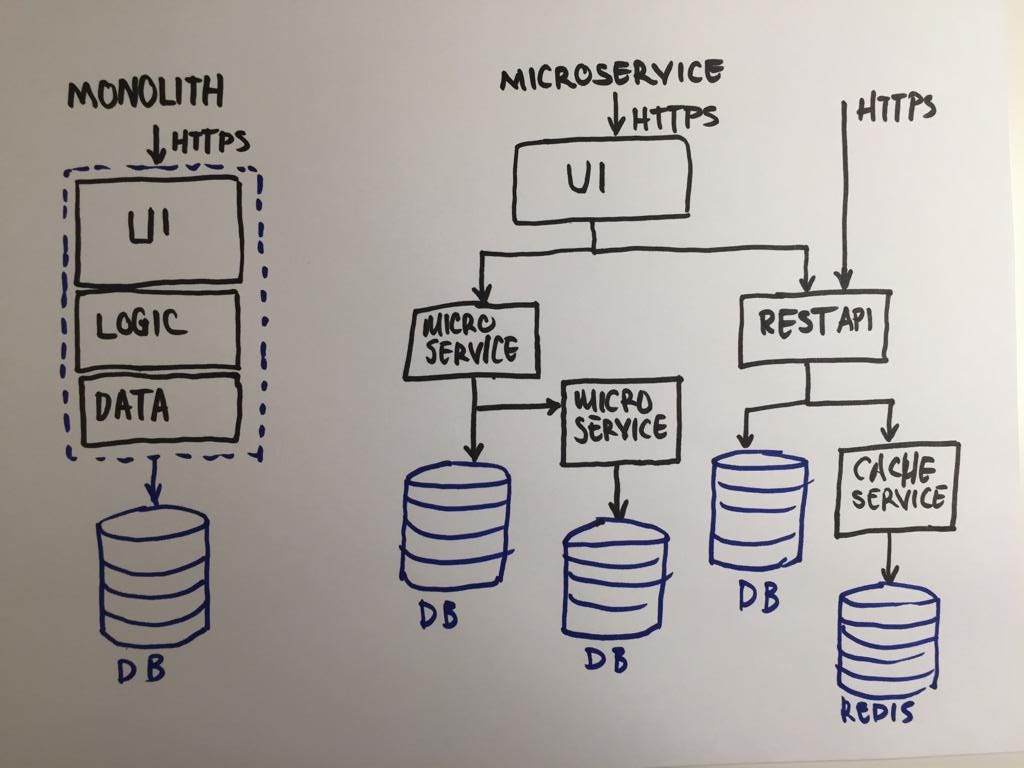
As you can see, a microservices architecture consists of many services, each a standalone application (an app that runs independently) except the UI. The UI is still a single block! While each backend service is handled by a different team and is fairly easy to scale, the frontend team still has to handle a monolith app, which can be a bottleneck of this architecture.

Besides, a monolith front-end brings a few annoying problems in team organization and people as mentioned above: it’s hard to split into different teams working independently on their own tasks.
The solution for front-end in microservices: Micro Frontends
The solution is fairly clear: simply apply the principles of microservices the way we do on the backend. Split the frontend monolith into multiple UI fragments. But UI isn’t like services, it’s the interface that connects users directly with the product, so it should be consistent and seamless rather than each piece being independent in its own style. Moreover, in the era of Single Page Applications, the rendering and logic of the web app live entirely on the client-side (client-side rendering: running in the browser). They’re no longer simple HTML files, but logic that is just as complex as on the backend side. The definition of micro frontend can be put like this:
The idea behind Micro Frontends is to think about a website or web app as a composition of features which are owned by independent teams. Each team has a distinct area of business or mission it cares about and specialises in. A team is cross functional and develops its features end-to-end, from database to user interface. (micro-frontends.org)
In my experience, at many companies it’s hard to apply the architecture proposed above to a product easily. Developers may get exhausted having to re-read and migrate a pile of legacy code from the old system (which is surely not clean code 😏) to micro front-end.
Overall structure and some terminology
We split a monolith app vertically along groups of business functionalities. Doing it this way, we end up with several smaller monolith apps whose structure is similar to the original monolith app. Next, we add a special app (think of it as a layer) on top of the small apps just created. This way, users talk to this special app, which is responsible for combining those small apps into one unified whole. This layer can be called the stitching layer, because it takes the individual UIs from those small monolith apps and finally produces a seamless UI for the user. This would be the simplest implementation of a micro frontends architecture.

To make it easier to understand, I’ll call these small monolith apps micro-apps, because they are all standalone apps and not just microservices: all of them have UI and each represents a different function.
As we know, the frontend ecosystem today is very flexible and can be extremely complex. So this direct implementation may not be enough for a very large product.
Problems to solve in micro frontends
- How do we combine the micro-apps into one unified and seamless UI?
It’s hard to answer this briefly. One idea is to create a shared UI library that is itself a standalone micro-app. That way, the other micro-apps depend on and inherit from the shared UI library micro-app. In this case, we only create a UI dependency and completely destroy the ideal of standalone micro-apps.
Another way is to create a layer of CSS custom variables at the :root: level. The advantage of this idea is that you can configure the theme globally across micro-apps.
Or we can share some SASS variables and mixins between dev teams. The downside of this approach is repeatedly implementing UI parts, and the integrity of the designs has to be checked and confirmed for each micro-app.
- How do we make sure teams don’t have CSS conflicts (overriding another team’s CSS)?
We can implement CSS scoping through CSS selector names, named after each micro-app. Putting this handling in the stitching layer makes development faster, but makes the stitching layer bulky.
With many libraries or frameworks there may be more ways to implement it. If you use React, you can look at styled-components, which turns every UI piece into a component so you never have to fear your CSS being overridden. You can read more here: https://www.styled-components.com/docs/basics.
- How do we share
global informationbetween micro-apps?
This is the most talked-about problem in micro-frontends architecture, and the solution is relatively easy: HTML5 has quite a few powerful features that most frontend developers don’t know about. For example, you can use custom events to share information between micro-apps.
Or you can develop a store along the lines of Redux for apps to communicate with each other.
- If micro-apps are standalone apps, how do we do client-side routing?
It depends on each design and each implementation. All current SPA libraries and frameworks have fairly powerful routing based on browser history state. The question here is which part is responsible for routing, and when?
My current approach is to create a top-level shared client router that dispatches to the micro-apps inside. Routing at the lower levels is decided by each micro-app. For example, say we have a route definition: /content/:id. The shared router routes the /content part to ContentMicroApp, then ContentMicroApp resolves the remaining /:id part.
- Is it possible to apply
Server-side Renderingto micro-frontends?
Server-side rendering is a pretty painful problem. If you’re considering using iframes to combine micro-apps, forget about server-side rendering. Using web components for the stitching task is no more powerful than iframes. But if each micro-app can render on the server side, the stitching layer only has to take responsibility for receiving HTML fragments from the server.
Read more about micro-frontends server-side rendering here: https://micro-frontends.org/#serverside-rendering–universal-rendering
Based on the questions and possible solutions mentioned above, we can summarize as follows:
Client-side
- How to compose micro-apps
- Routing
- Isolation and consistency of micro-apps
- App-to-app communication
- UI consistency across micro-apps
Server-side
- Server-side rendering
- Routing
- Dependency management
A flexible, powerful but minimal architecture: microfe

We’ve reached the most awaited part of the post 😂. The basic components and requirements of a micro frontends architecture are gradually emerging.
Through all the problems raised and solutions above, I started developing a solution for micro-frontends named microfe. Here I’ll describe the design goals of this project by naming the main components in an abstract way.
To keep it simple, start from the client side. There are 3 key components: AppsManager, Loader, Router, plus a MicroAppStore.

App Manager
App Manager is the core of the client-side micro-app. Its main feature is building the dependency tree. When all dependencies of a micro-app are resolved, it initializes the micro-app.
Loader
Another important part of the client-side micro-app is the Loader. Its job is to find and load unresolved micro-apps from the server side.
Router
As introduced above, we have a router on top. Its job is to direct to a micro-app based on the URL pattern. For example, if the url has /content/detail/13, the Router leads to ContentMicroApp, then this micro-app takes care of the rest, which is resolving details/13.
MicroAppStore
To solve the app-to-app communication problem on the client-side, I created MicroAppStore in microfe. Its features are quite similar to Redux, with one difference: it can synchronize and restore data structures when they change, reducing declaration time.
The server side seems more complex in implementation steps but has a simpler structure than the client-side. It consists of 2 main parts: StitchingServer and the MicroAppServers.
MicroAppServer

The minimum functionality of MicroAppServer can be summed up in two words: init and serve.
When a MicroAppServer runs, the first thing it has to do is init, specifically registering its endpoint with the SticthingServer, declaring the micro-app dependencies, type and URL schema of the MicroAppServer. I don’t think the serve part needs mentioning because there’s nothing special about it (just serving a web app over the network).
StitchingServer

StitchingServer provides a register endpoint for MicroAppServers. When a MicroAppServer registers itself with the StichingServer, the StichingServer stores that MicroAppServer’s declarations.
Then, StitchingServer uses the MicroAppServer’s earlier declarations to resolve a MicroAppServer from the URL the user requests.
After resolving a MicroAppServer and all its dependencies, everything in the CSS, JS and HTML files gets prefixed with that MicroAppServer’s name. An additional step is to prefix the CSS selectors of the CSS in the MicroAppServer (as mentioned above) to prevent CSS conflicts between micro-apps.
So, the main job of StitchingServer is: to assemble and return a coherent HTML page from the MicroAppServers (implemented according to their declarations).
Some other frameworks for micro frontends
Long before this architecture was called micro frontends in 2016, quite a few big companies tried to solve problems similar to micro frontends, for example Facebook with their BigPipe architecture. With the growth of the front-end side today, more and more companies are putting money and effort into micro frontends.
Zalando open-sourced Project Mosaic - a Microservices solution for the Frontend. You could say my microfe and Project Mosaic have a similar approach, but with some clear differences in implementation. While microfe scatters route definitions everywhere to increase the independence of micro-apps, Project Mosaic centralizes route definitions in one place and does layout definitions. This way, Project Mosaic seems easier to test and to do dynamic Layout generation.
There are quite a few other approaches that don’t need a server side, like using iframes to render, all running on the client-side. A fairly simple solution that needs no server structure or DevOps involvement. The work can be done well by the front-end team alone, at a lower time cost.
There’s also another framework for micro frontends, single-spa. This framework relies on the naming conventions of each app to resolve and load micro-apps. It’s easy to grasp the idea and follow the patterns of this framework. If you’re new to micro frontends you can try this one. Its downside is that you have to build each micro-app the way the single-spa framework dictates, which is a bit inflexible.
Some features introduced by single-spa:
- Framework Freedom: lets you use multiple js frameworks in a single-page application, split code by feature: use React, Vue, Angular, etc. together.
- Lazy load application: optimizes web app load speed by lazy loading modules. Modules are only loaded when needed, and already loaded modules aren’t loaded again.
- Front-end microservices: helps quickly combine small micro-apps (each app can use a different framework), scale the system up fast, and respond quickly to requirement changes.
Summary
Below are links to the github repos of micro-fe, developed by the author of the original post, Öner Zafer:
This post is translated and expanded from the post by Öner Zafer on Hackernoon.